Most interior design portfolios we review look like image collections. A few renders, some mood boards, maybe a floor plan. No story. No process. No evidence of thinking. Clients and employers do not hire image collectors. They hire problem-solvers who can transform a space and communicate how they did it.
A strong portfolio is not about showing pretty pictures. It is about demonstrating your design thinking, your process, and your ability to execute. This guide walks you through building a portfolio that gets you interviews, clients, and jobs.
What Makes a Strong Interior Design Portfolio?
Before diving into the steps, understand what separates portfolios that get callbacks from those that get ignored. Hiring managers, studio principals, and clients review dozens of portfolios. They spend 30-60 seconds on the first scan. Here is what makes them stop and look deeper:
- Process, not just outcomes: Show how you arrived at the final design. Include site analysis, concept development, iterations, and design rationale. The journey matters as much as the destination.
- Problem-solution framing: Every project should answer: What was the challenge? What did you do? Why did it work? This structure proves you think like a professional, not a student.
- Quality over quantity: 3-5 well-documented projects beat 15 shallow ones. Each project should be a complete case study, not just a slide of images.
- Technical credibility: Include floor plans, sections, furniture layouts, and material specifications. These prove you can deliver working drawings, not just concepts.
- Visual consistency: Use consistent fonts, layouts, and colour palettes throughout. A messy portfolio suggests a messy designer.
- Personal voice: Your portfolio should reflect your design sensibility. Whether minimal, eclectic, or sustainable-focused, a clear point of view makes you memorable.
With these principles in mind, let us walk through the step-by-step process of building your portfolio from scratch.
Portfolio Building Roadmap: 7 Steps at a Glance
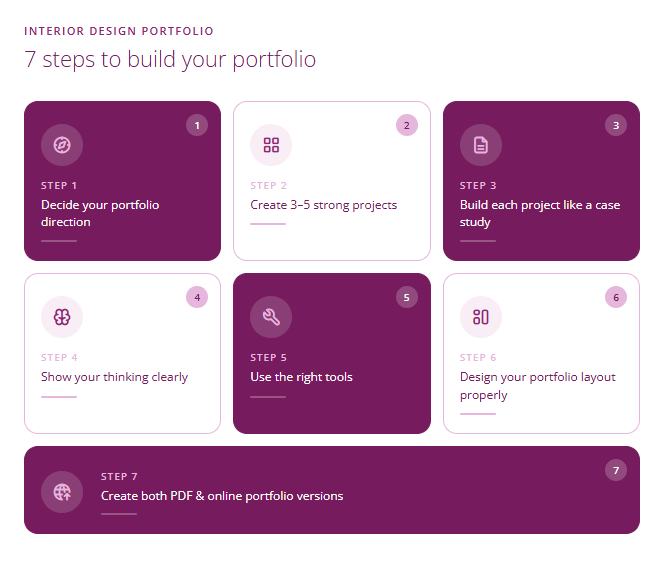
Before going into detail, here is the complete roadmap for building your interior design portfolio:
| Step | Focus | What You Do | Outcome |
|---|---|---|---|
| 1 | Direction | Choose your niche and target audience | Clear portfolio positioning |
| 2 | Projects | Create 3-5 strong projects (real or concept) | Core content ready |
| 3 | Case Studies | Document each project with full process | Professional depth |
| 4 | Thinking | Add design rationale and problem-solving | Demonstrates expertise |
| 5 | Tools | Use right software for drawings and presentation | Technical credibility |
| 6 | Layout | Design consistent visual presentation | Polished appearance |
| 7 | Formats | Create PDF + online portfolio versions | Ready for all situations |
Step-by-Step Process to Build Your Interior Design Portfolio
Follow these seven steps to build a portfolio that showcases your skills, communicates your value, and gets you hired. Each step builds on the previous one.
Step 1: Decide Your Portfolio Direction
Before creating anything, decide what kind of work you want and who you want to attract. A portfolio targeting luxury residential clients looks very different from one targeting commercial office fit-out firms. Your direction determines everything that follows.
Questions to answer:
- Do you want to work in residential, commercial, hospitality, or retail design?
- Are you targeting a job at a design studio or freelance clients?
- What is your design style: minimal, contemporary, traditional, eclectic, sustainable?
- What skills do you want to highlight: space planning, 3D visualization, material selection, project management?
Example: If you want to work at a commercial workplace design firm, your portfolio should emphasize office layouts, space efficiency, ergonomic considerations, and corporate aesthetics. Skip the bedroom makeovers.
Step 2: Create 3-5 Strong Projects
You need 3-5 substantial projects to build a credible portfolio. If you do not have real client work yet, create concept projects. Concept projects designed for your portfolio can be just as compelling as real projects if they demonstrate your skills properly.
Types of projects you can include:
- Real client projects: Work you have done for actual clients, even if small-scale or during internships.
- Academic projects: Strong studio projects from your coursework, re-documented professionally.
- Concept projects: Self-initiated designs for imaginary or real spaces. Pick a real site, invent a client brief, and design a complete solution.
- Redesign projects: Redesign an existing space you have access to: your home, a friend’s apartment, a local cafe. Document before-and-after.
- Competition entries: Design competitions provide real briefs with constraints. Even unselected entries demonstrate initiative.
Pro tip: Vary your project types. Include at least one residential and one commercial or hospitality project. Show range within your chosen direction.
Step 3: Build Each Project Like a Case Study
The biggest mistake beginners make is presenting projects as image galleries. A strong portfolio tells the story of each project from brief to completion. Each project should read like a case study with a clear narrative arc.
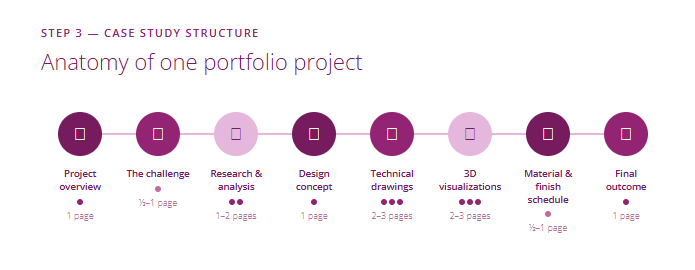
Case study structure for each project:
- Project overview (1 page): Project name, location, type, area, client brief, and your role. Include one hero image.
- The challenge (0.5-1 page): What problems did you need to solve? Space constraints, budget limits, client requirements, site challenges.
- Research and analysis (1-2 pages): Site analysis, user needs, precedent studies, concept exploration sketches.
- Design concept (1 page): Your central design idea, mood boards, material palette, colour scheme.
- Technical drawings (2-3 pages): Floor plans, furniture layouts, sections, elevations, ceiling plans, electrical layouts.
- 3D visualizations (2-3 pages): Rendered perspectives, walkthrough views, detail shots.
- Material and finish schedule (0.5-1 page): Specifications showing you understand real-world execution.
- Final outcome (1 page): How the design addressed the original challenge. If executed, include site photos.
Step 4: Show Your Thinking Clearly
Design thinking separates professionals from beginners. Employers and clients want to know why you made each decision, not just what you made. Your portfolio should make your reasoning visible.
Ways to show design thinking:
- Annotate your drawings: Add callouts explaining why you placed the sofa there, why you chose that circulation path, why the window seat works.
- Include process sketches: Show rough concept sketches and iterations. Messy thinking is evidence of real design work.
- Explain trade-offs: “We chose laminate over veneer to stay within budget while maintaining the warm aesthetic.” This shows practical judgment.
- Connect to client needs: “The client works from home, so we created a dedicated workspace that visually separates from the living area while maintaining natural light.”
- Reference design principles: Mention concepts like hierarchy, balance, focal points, or spatial flow. It demonstrates formal training.
Step 5: Use the Right Tools
Your portfolio demonstrates your technical skills through the quality of your drawings and visualizations. Use industry-standard software to ensure your work looks professional and matches what employers expect.
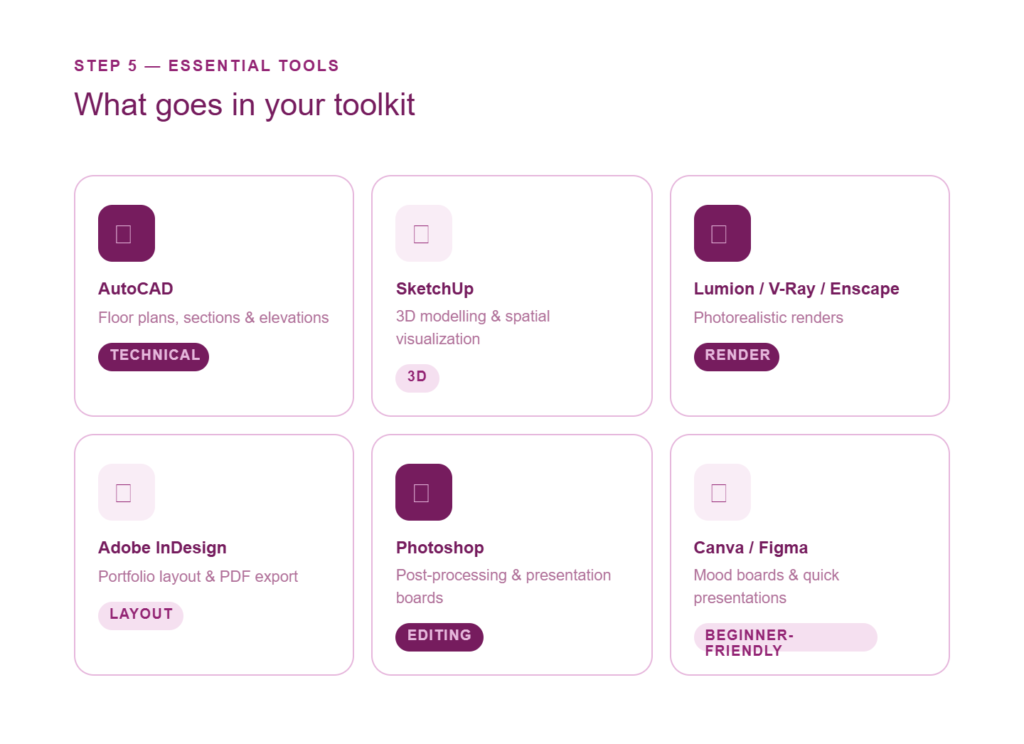
Essential tools for portfolio creation:
- AutoCAD: For floor plans, sections, elevations, and technical drawings. Clean CAD work is non-negotiable.
- SketchUp: For quick 3D modelling and spatial visualization. Excellent for concept development.
- Lumion, V-Ray, or Enscape: For photorealistic renders that make your designs come alive.
- Adobe InDesign: For portfolio layout and PDF creation. Master this for professional presentation.
- Photoshop: For post-processing renders, creating presentation boards, and image editing.
- Canva or Figma: For beginners who need simpler layout tools. Good for mood boards and quick presentations.
Step 6: Design Your Portfolio Layout Properly
Your portfolio layout is itself a design project. It should demonstrate the same visual skills you claim to have. Inconsistent layouts, clashing fonts, and poor image placement undermine your credibility as a designer.
Layout principles:
- Establish a grid: Use consistent margins, column widths, and image placement rules throughout.
- Limit your fonts: Use maximum 2 typefaces. One for headings, one for body text. Keep it simple.
- Use white space: Do not cram images together. Generous margins make work look more premium.
- Consistent image treatment: Similar sizes, consistent borders (or no borders), uniform shadow styles.
- Create hierarchy: Hero images should be large. Technical drawings can be smaller. Guide the eye.
- Page count: Aim for 30-50 pages total. 8-12 pages per project. Include a cover, contents page, and brief about-me section.
Step 7: Create Both PDF and Online Portfolio Versions
Different situations require different formats. You need both a downloadable PDF for email applications and an online portfolio for broader visibility. Each serves a different purpose.
PDF portfolio:
- Best for job applications, email submissions, and offline presentations.
- Keep file size under 15MB for easy email attachment. Compress images if needed.
- Export at 150 DPI for screen viewing. 300 DPI only if you expect printing.
- Include clickable links to your online portfolio and LinkedIn profile.
Online portfolio:
- Best for discoverability, social sharing, and quick access.
- Platforms: Behance (industry standard), Squarespace, Wix, Adobe Portfolio, or your own website.
- Optimize images for web (72 DPI, compressed) to ensure fast loading.
- Include contact information, LinkedIn link, and a clear call-to-action for potential clients or employers.
Common Portfolio Mistakes to Avoid
These mistakes instantly mark a portfolio as amateur. Avoid them:
- Image dumping without context: Renders without explanations are meaningless. Every image needs purpose.
- Inconsistent quality: One beautiful project and four mediocre ones hurts more than helps. Edit ruthlessly.
- No technical drawings: Renders alone suggest you cannot produce working documents. Include plans and sections.
- Copying tutorials: Projects that look like YouTube tutorial outputs are immediately recognizable. Create original work.
- Poor image resolution: Pixelated or blurry images suggest carelessness. Export at appropriate quality.
- No contact information: Make it easy for employers to reach you. Include email, phone, and LinkedIn on every portfolio.
How ASDAV Helps You Build a Portfolio That Gets You Hired
Building a strong portfolio is one of the most important investments in your interior design career. It is also one of the hardest things to do alone. Most self-taught portfolios lack the structure, depth, and professional polish that hiring managers expect.
ASDAV offers a dedicated Portfolio Development Masterclass that walks you through building a portfolio from scratch with expert feedback. The masterclass covers project selection, case study documentation, layout design, and presentation skills.
For comprehensive training that includes portfolio development as part of a structured curriculum, explore the Residential Interior Design Programme (12 weeks, ₹37,999) or the Commercial Interior Design Programme (12 weeks, ₹32,999). Both programmes include live client projects that go directly into your portfolio, mentorship from practising designers, and job support.
Frequently Asked Questions
Can I create a portfolio without real client work?
Yes, you can create a strong portfolio without real client work. Concept projects, academic projects, redesign projects, and competition entries all count as valid portfolio content. What matters is the depth of your documentation and the quality of your design thinking, not whether a client paid for the work. Many successful designers started with entirely self-initiated projects in their portfolios.
How often should I update my portfolio?
Update your portfolio every 6 months or whenever you complete a significant new project. Remove weaker projects as stronger ones come in. Your portfolio should always show your best current work, not a historical archive of everything you have ever done. If you are actively job hunting, review and refresh your portfolio before each application cycle.
Which format is better: PDF or website?
You need both. A PDF portfolio is essential for job applications, email submissions, and offline presentations. An online portfolio is essential for discoverability, social sharing, and allowing employers to quickly browse your work. The PDF should be comprehensive (30-50 pages), while the online version can be more curated. Link them together so viewers can easily switch between formats.
How long should an interior design portfolio be?
An interior design portfolio should typically be 30-50 pages covering 3-5 projects. Each project should be documented across 8-12 pages including overview, challenge, process, drawings, renders, and outcome. A portfolio that is too short (under 20 pages) suggests lack of depth. A portfolio that is too long (over 60 pages) suggests inability to edit. Quality and depth per project matters more than total page count.
Should I include hand sketches in my portfolio?
Yes, include hand sketches if they demonstrate your design thinking process. Concept sketches, space planning explorations, and detail studies show how you develop ideas. Sketches do not need to be artistic masterpieces. They should be clear, purposeful, and show your thinking. Include them in the process documentation section of each project alongside your digital work.
Related Resources
- Portfolio Development Masterclass
- Residential Interior Design Programme (12 Weeks)
- Commercial Interior Design Programme (12 Weeks)
- Top Interior Design Jobs & High-Pay Roles in India
- All Interior Design Courses at ASDAV

Jasmine Ahluwalia is a Licensed Architect, Interior designer, Global Vastu consultant and the founder of ASDAV.
She is a graduate of Scuola Master F.lli Pesenti, Politecnico di Milano, and brings strong global exposure through academic learning and professional design projects. Her background combines architecture, interior design, and applied design education.
Before founding ASDAV, Jasmine worked as an assistant professor at Amity School of Architecture and Planning, Amity University Noida. Her research covers sustainable architecture, urban heat island reduction, and circular economy practices in construction. Her work has been published in Scopus indexed and peer reviewed journals as well. She also has strong international on-site experience from countries like Canada, Mauritius, UK, and many more.
Through ASDAV, she has trained more than 500 students across 25 cities. The ASDAV platform has 12+ instructors from IIT, SPA, CEPT and NID , and has delivered over 200 live learning sessions. Her mission is to bridge the gap between design education and real industry expectations, to deliver real growth for her students.
She designs spaces for a living, but her favourite project is designing careers.